Full Game Library On the Go
Access all 9,500+ pokies, live tables from Evolution Gaming and Pragmatic Play Live, crash games and jackpot titles through a single native app on Android or iOS.
App at Slots Gallery: Live Casino on Mobile
The full Slots Gallery experience in your pocket - 9,500+ pokies, live dealer tables from Evolution Gaming, AUD deposits and 24/7 support on Android and iOS.
Everything in One App
The full Slots Gallery experience in your pocket - 9,500+ pokies, live dealer tables from Evolution Gaming, AUD deposits and 24/7 support on Android and iOS.
Get the App You must be 18 or older to play. Gambling carries a risk of addiction. Bonus offers are subject to terms and conditions.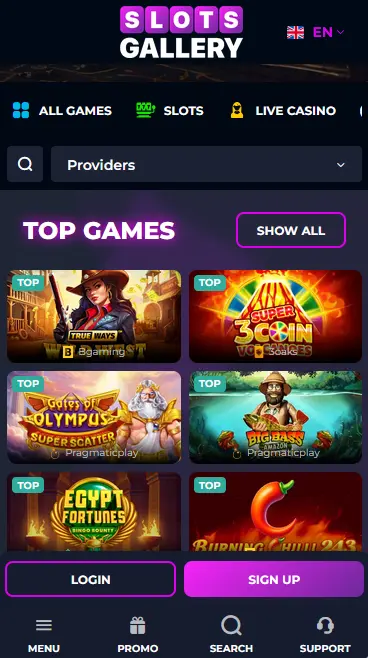
How to Download and Install
App Highlights
Full Game Library On the Go
Access all 9,500+ pokies, live tables from Evolution Gaming and Pragmatic Play Live, crash games and jackpot titles through a single native app on Android or iOS.
Instant Deposits and Fast Payouts
Deposit in AUD via Visa, Bitcoin, Skrill or Neosurf directly from the app cashier. Crypto and e-wallet withdrawals process in 0-1 hours after verification.
Biometric Login and 2FA
Log in with fingerprint or face recognition on supported devices. Two-factor authentication is configurable in app settings for additional account protection.
App Compatibility
Android
iOS
App Pros and Cons
Pros
Cons
App Security Best Practices
What You Should Do
What You Should Avoid
The Slots Gallery native app delivers the complete casino experience on a handheld screen. Every game in the 9,500-title lobby is accessible through the app, from BGaming pokies and Pragmatic Play crash titles to live dealer tables from Evolution Gaming and Playtech. The app also includes the full cashier, bonus management, loyalty program tracking and 24/7 live chat support, removing the need to switch to a browser for any account task.
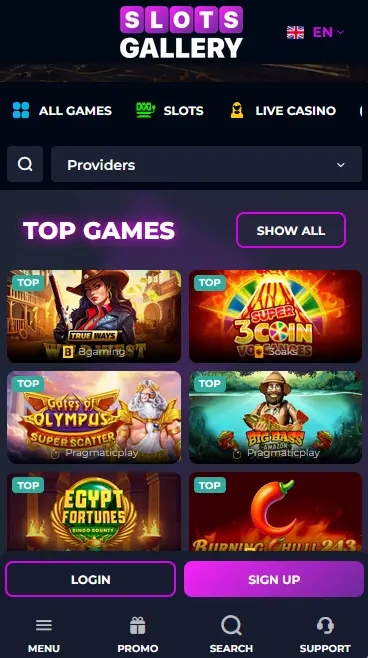
The cashier inside the app supports all payment methods available on desktop, including Visa, Mastercard, Bitcoin, Ethereum, Skrill, Neteller, Neosurf and Flexepin. Deposits in Australian dollars clear instantly for card and crypto payments. Withdrawals via cryptocurrency and e-wallets process in 0-1 hours from approval. Biometric login using fingerprint or face recognition is supported on compatible Android and iOS devices, and two-factor authentication can be enabled in the security settings.
The native app and the mobile browser version deliver identical game libraries and cashier functionality. The primary practical advantages of the app are biometric login, faster page loading through cached assets, and push notification support for promotional offers and bonus expiry reminders. Either route is a fully valid way to play; the choice comes down to personal preference.
Open Google Play, search for Slots Gallery Casino and tap Install. The download completes automatically and the app appears on your home screen. Alternatively, visit slotsgalleryslots.com in your mobile browser, navigate to the app section and download the APK. Open the downloaded file from your Downloads folder; if a security prompt appears, tap Settings and enable Allow from this source, then proceed with the installation.
Open the App Store, search for Slots Gallery Casino and tap Get. After installation, launch the app and log in with your registered email and password. To enable Touch ID or Face ID, go to the in-app settings menu and toggle on biometric login. All subsequent sessions can then be opened with a fingerprint or face scan.
If you prefer not to install an app, the Slots Gallery website works in any modern mobile browser. In Safari on iOS, tap the Share icon and choose Add to Home Screen to create a shortcut that opens the site in full-screen mode.
| Platform | Installation Method | Biometric Login |
|---|---|---|
| Android | Google Play / Direct APK | Fingerprint |
| iOS | App Store | Face ID / Touch ID |
| Mobile browser | No install required | Not applicable |
The app is compatible with modern Android and iOS devices. Very old operating system versions may not be supported; updating to a current OS version resolves compatibility issues in most cases.
The full pokie catalogue is present in the app, including high-volatility titles such as Gates of Olympus 1000 and Sugar Rush 1000 from Pragmatic Play, Book of Dead from Play’n GO and Pirots 3 from ELK Studios. BGaming’s Gold Rush with Johnny Cash, the game tied to the welcome free spins offer, is accessible directly from the bonus section.
Live dealer tables from Evolution Gaming, Pragmatic Play Live, Playtech Live, Ezugi, VIVO Gaming and LuckyStreak stream in HD to the app. Lightning Roulette, Crazy Time, Monopoly Live and Infinite Blackjack from Evolution Gaming load with the same performance as on desktop. The app handles multiple camera angles and live chat with dealers without buffering on a standard 4G connection.
RNG versions of blackjack, European roulette, baccarat and Casino Hold’em are all in the app’s table games section. The progressive jackpot section includes Mega Moolah from Games Global, with the live prize pool displayed in real time.
New players registering through the app receive the same welcome offer as on desktop: a 100% match up to AUD 777 plus 100 free spins on Gold Rush with Johnny Cash by BGaming using code SLOTS on a minimum AUD 20 deposit. Fifty free spins credit immediately; the remaining 50 land the following day. Wagering requirement: 40x. Bonus valid for 5 days. 18+ only. T&Cs apply.
All recurring promotions, including Friday cashback (5% on weekly losses over AUD 200, 30x wagering), the Weekly Bonanza lottery and Monday reload code MONDY, are accessible and claimable through the app cashier. Loyalty points accumulate from every wager placed in the app on the same 25-level scale as the browser version. 18+ only. T&Cs apply.
| Method | Type | Processing |
|---|---|---|
| Visa / Mastercard / Maestro | Card | Instant |
| Bitcoin / Ethereum / Tether | Crypto | Instant |
| Skrill / Neteller / Payz | E-wallet | Instant |
| Neosurf / Flexepin | Voucher | Instant |
| Bank Wire Transfer | Bank | 3-5 days |
Crypto and e-wallet withdrawals process in 0-1 hours after internal approval. Card withdrawals take 1-5 business days. Bank wire transfers clear in 5-7 business days. Minimum withdrawal is AUD 50. KYC verification must be completed before any withdrawal is processed.
Open the app and tap Sign Up. Enter your email address, create a password and confirm via the link sent to your inbox. Once verified, navigate to the cashier to make your first deposit and claim the welcome bonus.
Enter your email and password on the login screen, or use biometric login if already configured. Two-factor authentication sends a one-time code to your registered device when enabled. The app stores your session so returning visits load directly to the lobby.
All data transmitted through the Slots Gallery app is protected by 256-bit SSL encryption. Two-factor authentication is available in settings and is recommended for all accounts with real-money balances. Biometric login keeps your credentials off the keyboard entirely on supported devices. Hollycorn N.V. staff will never request your password or 2FA code; treat any such request as a phishing attempt.
Live chat is accessible from the help icon within the app and connects to the 24/7 support team. For account or responsible gaming requests, email [email protected]. Players who need to set deposit limits, loss limits or wager limits can request these through the same email channel.
App FAQs
Yes, the native app gives full access to all 9,500+ titles including pokies from BGaming and Pragmatic Play, live dealer tables from Evolution Gaming and crash games from Spribe.
Yes, an APK file is available directly from slotsgalleryslots.com; install it by enabling 'Allow from unknown sources' in your Android device settings before running the file.
After logging in with your email and password, open the app settings menu and toggle on Face ID or Touch ID; subsequent logins will use your device's biometric sensor instead of a password.
Download the App and Start Playing
Grab 100% up to AUD 777 and 100 free spins.
Enter the Casino You must be 18 or older to play. Gambling carries a risk of addiction. Bonus offers are subject to terms and conditions.